Updated August 2, 2026. The safe way to reach your personal account is to begin at SSA.gov/myaccount. Since June 7, 2025, Social Security's old username-and-password option has been removed. Login.gov and ID.me are the only sign-in choices for SSA online services.
Quick Answer: Which Sign-In Should You Use?
If you already have a Login.gov or ID.me account, you can usually use that existing account to reach my Social Security. If you have neither, choose one through SSA's official sign-in page. You need only one provider, although SSA says a person may have accounts with both and use either to access the same personal Social Security account.
There is no universally correct provider for everyone. Login.gov is a federal shared sign-in service. ID.me is a private credential provider accepted by SSA and other organizations. Both handle identity proofing and multi-factor authentication before returning you to SSA. The account information and benefit services you see afterward belong to SSA.
Whichever option you choose, keep its email address and recovery methods current. That small maintenance step is easier than trying to recover access during a time-sensitive benefit or document request.
Login.gov vs ID.me for my Social Security
| Question | Login.gov | ID.me |
|---|---|---|
| Accepted by SSA? | Yes | Yes |
| What is it? | A U.S. government shared sign-in service | A private identity and sign-in provider used by SSA |
| Can an existing account be used? | Yes, if it is your own account | Yes, if it is your own account |
| Who fixes password or MFA problems? | Login.gov support | ID.me support |
| International users | Follow SSA's current international instructions | SSA currently directs customers with a foreign mailing address to its ID.me international route |
Choose based on an account you already maintain, the identity-verification route available to you, and which recovery methods you can keep current. Do not create duplicate provider accounts casually to work around an error. Duplicate identities or mismatched emails can make troubleshooting harder.
Each person must have their own provider account and unique email address. A spouse, adult child, caregiver, or representative payee should not sign in using someone else's provider credentials. Even within a household, passwords and one-time codes are individual security controls.
What Happened to the Old Social Security Username?
The standalone Social Security username and password no longer work. Effective June 7, 2025, SSA removed that sign-in option and retained only Login.gov and ID.me. Typing an old username into a provider page will not migrate it, because Login.gov and ID.me credentials are separate.
Begin from SSA's account page and choose one of the two provider buttons. If you already created an account with that provider for another government service, sign in with those existing credentials. After provider authentication and any required identity steps, the service redirects you back to SSA.
Do not confuse a mailed activation code, benefit letter code, personal identification number used for a particular transaction, or one-time authentication code with a permanent SSA username. There is no general “SSA PIN login” that replaces Login.gov or ID.me in 2026.
How to Create or Connect Your Account Safely
- Type ssa.gov into your browser or use a trusted bookmark, then open my Social Security.
- Choose Login.gov or ID.me on SSA's page.
- Sign in to your existing personal provider account, or create one using your own unique email address.
- Set up multi-factor authentication and save recovery or backup information securely.
- Complete the provider's identity-verification steps.
- Allow the provider to return you to SSA, where your Social Security services appear.
Address-bar checks matter. SSA pages use an official ssa.gov domain, Login.gov uses login.gov, and ID.me support should be reached through ID.me's official domain. An advertisement that appears above the real search result is not automatically an official sign-in page.
People with a foreign mailing address should not force a domestic setup with inaccurate information. SSA's current account FAQ directs international customers to its Service Around the World instructions and an ID.me route. Follow that current official page because country and identity options can change.
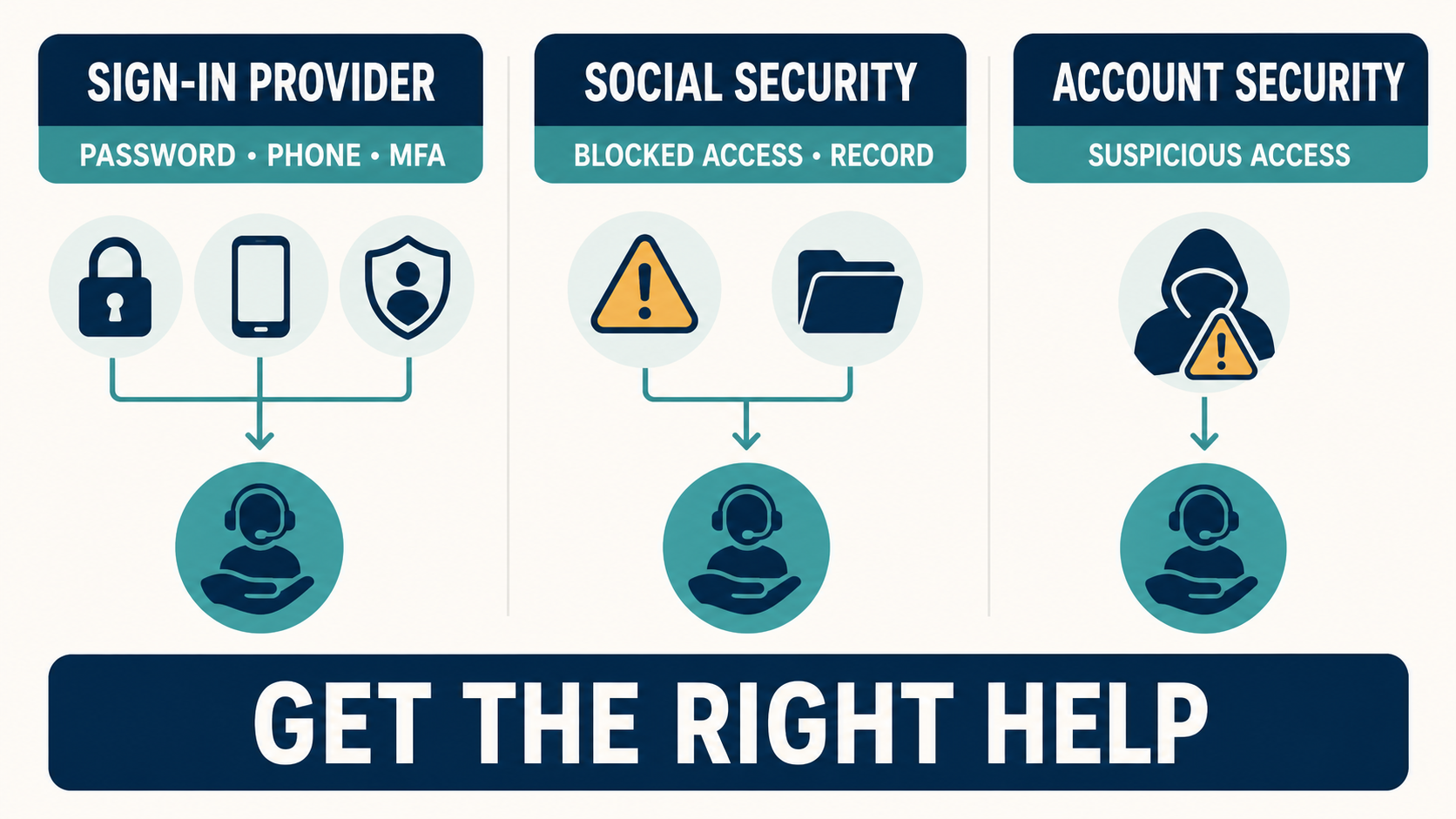
Who Should Fix Your Login Problem?
A frustrating loop often happens when a user calls SSA for a provider password problem or asks the provider to change an SSA record. Use the symptom—not the page color—to identify the owner.
| Problem | First place to get help | Why |
|---|---|---|
| Forgotten provider password | Login.gov or ID.me | The provider controls its credentials |
| Changed phone, email, or authentication method | Login.gov or ID.me | The provider manages MFA and recovery settings |
| Identity-proofing step will not complete | Chosen provider | The provider operates the proofing workflow |
| Electronic access is blocked or must be deactivated | SSA | SSA controls access to the Social Security record |
| Provider sign-in succeeds but SSA information is wrong | SSA | The underlying benefit or earnings record belongs to SSA |
| Suspicious sign-in or stolen recovery codes | Provider immediately, then SSA if access may be affected | Secure credentials first and protect the linked service |
SSA's February 25, 2026 account-help FAQ says provider support can assist with password changes, email or phone updates, authentication methods, face or touch unlock, and identity proofing. SSA can assist with blocking or unblocking electronic access and deactivating access. If you need SSA contact details, use our current Social Security phone and hours guide.
If You Changed Your Phone or Email
Use the recovery process of the provider you selected. If you configured another authentication method—such as an authentication app, security key, or stored backup codes—it may let you regain access without the old phone. Available options differ by provider and by what you set up earlier.
Do not ask a relative, online “agent,” or stranger to receive your code. A support representative should not need you to disclose a live one-time code. Use Login.gov Help for a Login.gov account or the ID.me Help Center for an ID.me account.
As of this update, SSA lists 844-875-6446 for Login.gov technical support. Because provider contacts can change, verify any number on SSA's current account-help page before calling. ID.me support should be initiated through its official Help Center rather than a phone number copied from an ad or forum.
If Identity Verification Fails
Read the provider's error message carefully and compare the legal name, date of birth, address, and ID details you entered with the documents you are using. A nickname, recent name change, moved address, unreadable image, expired ID, or a mismatch in the underlying record may interrupt the process.
Follow the provider's current evidence and recovery choices. Some cases may offer another document, a video or live verification route, or a support review, but availability is provider- and account-specific. This site cannot predict approval or processing time.
If provider authentication finishes but SSA refuses the connection or displays record information that is not yours, stop and contact SSA. Save the date, browser, and non-sensitive error wording. Do not send a screenshot if it exposes an SSN, claim number, address, payment data, QR code, or session token.
Basic Browser Troubleshooting
SSA's account FAQ lists current versions of Chrome, Edge, and Safari among supported browsers and provides cache-and-cookie instructions. Before escalating a vague loading problem:
- Close duplicate SSA and provider tabs, then start again at SSA.gov.
- Update the browser and operating system.
- Clear cookies and cached data for the affected official sites.
- Temporarily disable an extension only if you understand it and can re-enable it.
- Do not use a public computer or public Wi-Fi to expose identity documents or recovery codes.
A browser fix cannot correct a locked provider account or an SSA-record mismatch. If the same defined error continues on a supported browser, use the appropriate official help desk.
What Can You Do Inside my Social Security?
Features depend on whether you receive benefits and on your record. Examples SSA lists include reviewing an earnings record, viewing retirement estimates, checking benefit or payment information, getting a benefit verification letter, retrieving certain tax forms, and managing some applications or account updates.
For help interpreting an estimate after you sign in, see how to find your estimated Social Security benefit online. For general deposit tracking and what “pending” can mean, see our direct-deposit tracking guide. If a scheduled payment is missing, use the site's missing payment checklist.
Your dashboard is account-specific. A missing feature does not necessarily mean a benefit was denied or stopped. It may not apply to your status, may require a separate application, or may be temporarily unavailable.
Avoid Login and Support Scams
- Start at SSA.gov instead of clicking an unsolicited message.
- Do not share passwords, one-time codes, backup codes, or remote access to your device.
- Do not pay to “unlock” a my Social Security account.
- Be cautious with search ads and phone numbers displayed by map or directory sites.
- Do not install a supposed “my Social Security app” from an unofficial link; use the official web route unless SSA publishes otherwise.
If credentials may have been exposed, change the provider password from its official site, review authentication methods, and contact the provider. Ask SSA to block electronic access if appropriate. If personal information has been used fraudulently, create a recovery plan at IdentityTheft.gov.
Frequently Asked Questions
Can I still sign in with my old Social Security username?
No. SSA says that option ended June 7, 2025. Start at SSA.gov and use Login.gov or ID.me.
Do I need both Login.gov and ID.me?
No. One provider account is enough. SSA says you may have both, but you should use your own unique account and email address for each.
Is my Medicare login the same account?
No. A personal Medicare account is accessed through Medicare.gov. Do not enter Medicare.gov credentials into a Social Security login screen or assume the two dashboards are identical.
What if I cannot create any online account?
SSA's current FAQ directs users who cannot create a personal account to contact their local Social Security office and notes that an appointment is required. Confirm the current process through SSA's official account-help page or office locator.
Official Help Links
- SSA: Sign in or create a personal account
- SSA: Account FAQs and help
- SSA: Creating or getting help with an account
- Login.gov: Social Security help
- ID.me Help Center
SocialSecurityPayment.net is an independent informational website and is not affiliated with SSA, Login.gov, or ID.me. We cannot access, create, unlock, or troubleshoot an individual account. Never send us credentials, identity documents, security codes, or Social Security numbers.
Loading comments...