
Updated November 18, 2026. Use the Social Security Administration's 2027 calendar to find the scheduled date for your Supplemental Security Income (SSI) payment. Chime may release the deposit before that date if it receives the payment file early. Chime's public guidance describes possible early access, and its published calendar available at this review covers 2026. For 2027, the date you can verify in advance is the government payment date. SSA 2027 payment calendar and Chime benefits payment help.
Start with the official 2027 SSI payment date
Look up the month the money is for before looking up the day you expect it in your account. A recurring SSI payment normally belongs to the month that begins on the first of the month. When that day is a weekend or legal holiday, the government schedules delivery for the previous day that is neither a weekend nor a legal holiday. The payment keeps its original benefit-month label. SSA's SSI payment rule.
Open the 2027 PDF and follow the legend for Supplemental Security Income. It shows SSI alongside several Social Security schedules. Pick the SSI marker and confirm the year before looking for a deposit on your Chime activity screen. If you prefer an accessible month-by-month list, the 2027 SSI dates guide pairs each benefit month with its scheduled payment date.
Early SSI payments in the 2027 calendar
The January 2027 SSI payment is scheduled for Thursday, December 31, 2026. SSA also identifies that scheduled payment as the first increased SSI payment for 2027. Record the transfer in December under its January benefit month. Your own notice provides the amount, which can differ from the federal maximum. SSA's 2027 COLA payment FAQ.
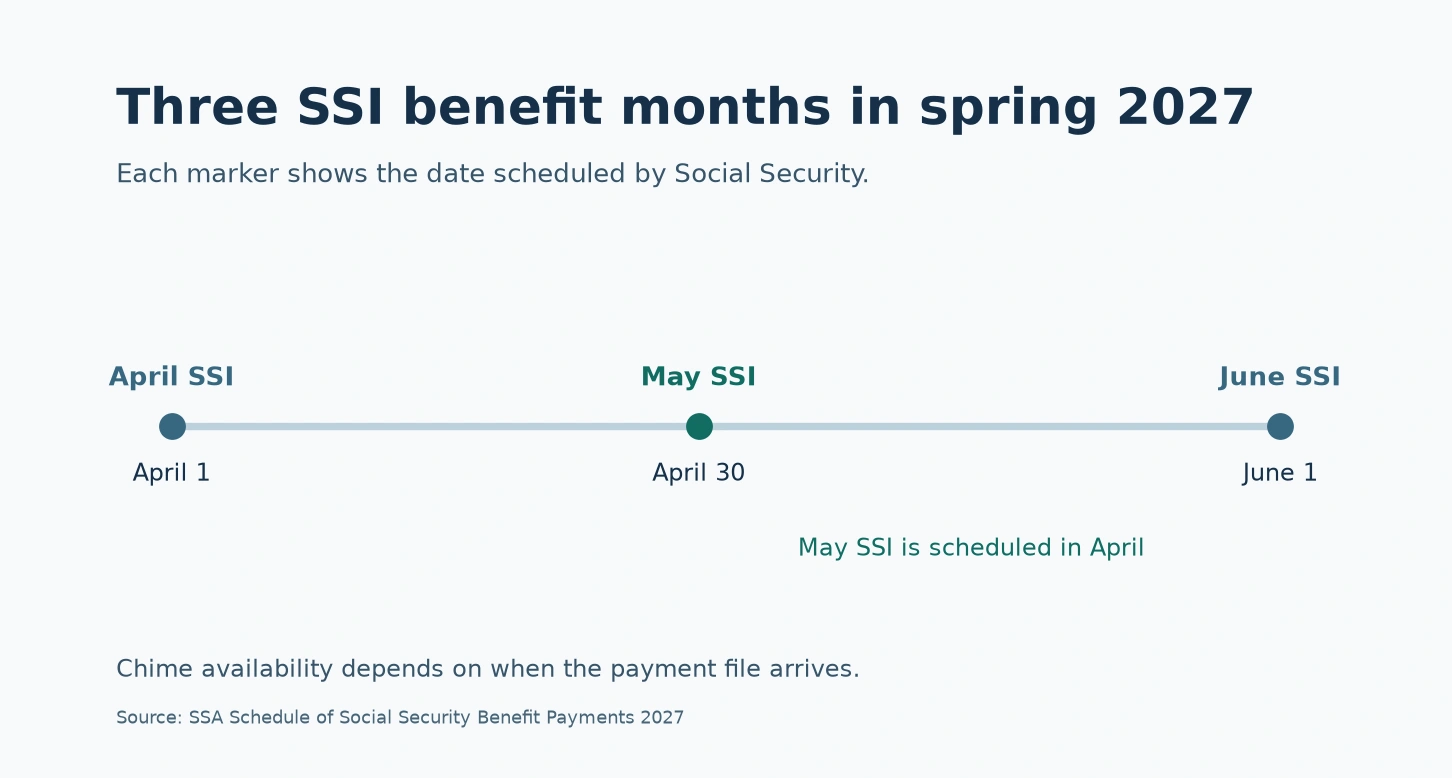
May and August are two other months to mark. May 1, 2027 falls on Saturday, so SSA's scheduled SSI date is Friday, April 30. August 1, 2027 falls on Sunday, so its scheduled date is Friday, July 30. In April, the two scheduled SSI payments cover April and May. The next regularly scheduled SSI payment covers June and is dated June 1. Tracking payment labels makes the longer gap after April 30 easier to interpret. Official 2027 calendar PDF.
If you receive SSI and Social Security together
Check both programs on the calendar. In the regular combined-benefits schedule, SSI is due on the first, with Social Security due on the third. On a month like February 2027, that gives February 1 for SSI and February 3 for Social Security. An earlier weekend or holiday adjustment can bring the two payment dates closer together. Keep each benefit on its own line in your notes so you can follow up about the correct deposit.
Social Security beneficiaries on the regular pre-May 1997 schedule also use the third-day group. Many people who receive Social Security by itself use a Wednesday group based on the applicable birthday, and the calendar legend lists those groups. Check the schedule shown in your own records if your household has more than one benefit or if you manage someone else's payments. 2027 Social Security payment schedule.
How Chime decides when your SSI deposit is available
Two steps determine when you can use the money. SSA schedules the payment and sends payment instructions through the federal payment system. Chime says it generally makes the direct deposit available when it receives the payment file. If the file reaches Chime before the scheduled day, you may see the money early. Chime describes early availability of up to two days for some government-benefit deposits. The timing depends on the particular payment, including when the file is transmitted. Chime's guidance on Social Security and SSI.
You can see how the two steps work by considering a regular first-of-the-month payment. The first is the planning date from SSA. Any earlier posting you have seen before is part of your past account activity. Similar timing across several months can help you recognize the pattern, but it leaves you without a confirmed future arrival time. If a holiday has already moved the official day, start with that adjusted government date. It reflects the actual schedule for the month you selected.
The first deposit after a change of account deserves particular attention. Chime notes that the payer may still be updating its records during the first deposit cycle. Track the change with SSA and keep checking the destination associated with the upcoming payment. The sending agency and receiving account each have one part of the information you need. Chime's early direct deposit help.
Where to check Chime estimates and deposit alerts
Start in Chime's app or Help Center. If you see a calendar image, verify the publication date, year, benefit program and key. Chime's 2026 article includes graphics labeled as estimates alongside standard dates. That format can be easy to misread when an image has been copied without its legend. A date next to SSI might be the official date or an estimate for Chime, depending on the label. Chime's 2026 benefits calendar and legend.
Check your account activity for the actual deposit. Chime says that members who enable notifications can receive an email or push alert when funds become available. A payment alert for your own account and a calendar screenshot from a community group tell you different things. The alert reports activity after Chime has something to report. The screenshot can at most tell you what someone expected or saw at a particular time. If an alert seems unfamiliar, open the app directly to confirm the transaction.
Set up or update where your SSI goes
Start in your Chime account to confirm the destination you want to use. Chime currently puts checking-account details under Profile, then Account details in the app. Use the partner bank shown for your own account when the enrollment process asks you to identify the bank. Chime also advises that the name on the receiving account match the one the payer uses. A mismatch can delay a deposit or send it back. Keep private payment details within your authenticated account and official enrollment channels. Chime's account details help and Chime's direct deposit requirements.
For SSI, SSA's program-specific guidance directs recipients to call the agency or contact a local office for a direct deposit change. You can use your personal my Social Security account to check your payment method. Some institutions can send an update to SSA using automated enrollment. Ask about that option through secure support and follow the steps SSA provides for your benefit. If you receive Social Security and SSI together, ask which benefit payments the change covers before assuming they will both move on the same cycle. SSA's SSI and Social Security change FAQ and SSA's direct deposit options.
Suppose you make a change in late March and expect the April SSI deposit. Check the old destination and Chime on the scheduled day while the update is in progress. If the old account received the payment, record where that cycle posted and verify the effective change with SSA. If Chime received it, confirm that the item is the recurring deposit before treating the switch as complete. SSA advises keeping the old account open until you have seen your SSI reach the new account. A setup confirmation can show the request was made. Actual posting shows that a specific payment reached the new destination. SSA's guide for SSI recipients.
If the deposit destination shown by SSA changed unexpectedly, contact the agency and your financial institution through their official channels. Open the app or type the official address into your browser instead of working from an unsolicited message. Keep a private record of whom you contacted and the month in question so you can refer back to it.
What to do when your Chime SSI payment is missing
First determine which date has passed. The response changes when the official payment date arrives. On a potential early day, verify the date you are using and check your account. On the day SSI is due, contact your financial institution if the money is still missing. SSI's recipient guide gives that bank-first process for electronic deposits. SSA's guide for SSI recipients.
Before the official payment date
Confirm you are expecting a regular SSI payment for the right month and checking the right destination. If a friend has been paid, check whether that person receives the same benefit and uses the same institution. A Social Security payment may be for a different program or a separate cycle. A Chime customer with a posted deposit can tell you only that their own payment arrived.
Open transaction activity and check for an entry or an alert tied to your account. If there is no entry, review any recent enrollment or account change, and look at the earlier destination if it remains open. Chime explains that it cannot see a deposit before it receives the payment file. During that gap, its support team can explain your setup and posted activity, while the federal schedule still gives you a date to plan around. Chime's direct deposit status help.
On or after the official payment date
- Ask the financial institution about the missing electronic payment. Check the correct account activity and contact support through the official app. Explain the benefit type and scheduled date. Ask whether there is a posting delay or a returned item. If the institution can see an attempted deposit, ask what it can confirm and what SSA needs to review.
- Check with SSA if the payment remains unresolved. Call 800-772-1213, use TTY 800-325-0778, or contact your local Social Security office. Explain whether the bank reported a delay, a return or no record of the deposit. SSA can look at whether the payment was issued, where it was sent and whether action is needed on an amount due.
- Use the benefit notice if a smaller deposit posted. Compare the deposit with the expected amount for that benefit month. If the notice shows a different amount or a suspension, the next step is to understand the SSA decision. If the payment was issued but the money is missing at the destination, keep following the electronic-payment process.
Use SSA's electronic-payment guidance for a direct deposit. The separate mailing-days language in the calendar addresses payments expected by mail. Follow up through authenticated channels and keep account details private while working with the bank or the agency. SSA's missing-payment instructions and our missing-payment checklist.
Plan bills around the schedule you can verify
A monthly calendar can show whether an early government date helps cover a bill that is due soon after the month begins. Put the scheduled SSI payment on the calendar first. Then enter the date on which each bill's payment needs to leave your account. For a bill that is due on the first, the money may need to leave earlier if you pay by mail or the company takes time to process an electronic payment. Checking that outgoing date matters as much as identifying the incoming payment. CFPB's bill calendar worksheet.
Apply that method to August 2027. SSA schedules the August SSI payment for July 30. You can mark July 30 as the published incoming date, then label the funds as August money when laying out expenses. If you already earmarked the earlier July payment for July bills, keeping those labels makes it easier to see how much belongs to each month. Check the September 1 scheduled payment as well. The span between the two scheduled dates matters when you look at bills near the end of August. SSA's calendar index.
Use the same method in a month with a regular first-day payment, especially if a bill is set to come out right away. An estimate about early Chime availability could put the incoming and outgoing dates in the wrong order. If the due dates are tight, find out when a biller will debit the payment and whether it offers a different due date. Confirm any change directly with the biller and plan using the scheduled payment and funds you can verify. Leave the actual arrival time blank until you see it in your account.
Keep a short payment record
In a short payment record, note the benefit month, official payment date, date posted and any follow-up. For example, enter August 2027 SSI and July 30, 2027 scheduled. After the deposit appears, record the actual day you saw it post. If it went to a different destination during a switch, record which institution received it in your private records. If it is missing, note the date you contacted support so you can describe the sequence without rebuilding it from memory.
This record is especially helpful across the turn of the year. Attach the label January 2027 to the SSI payment scheduled for December 31, 2026, and look at January's expenses before treating the year-end balance as available for December. When SSA publishes a new annual schedule, update the government date from the new PDF. When Chime publishes an estimate, keep it in a separate note with its source date. Each entry should tell you whether it is a scheduled date, a possible earlier date or an actual deposit.
Social Security Payment is an independent information site. Use SSA to confirm individual payment dates and amounts, and Chime's official app or support channels to verify activity in a Chime account.
Loading comments...